
Place your first order
The Order Entry ticket — size, price, type, and the four buttons.
The ticket works like a Lightspeed or DAS order entry window. Load a price, set a size, press a side.
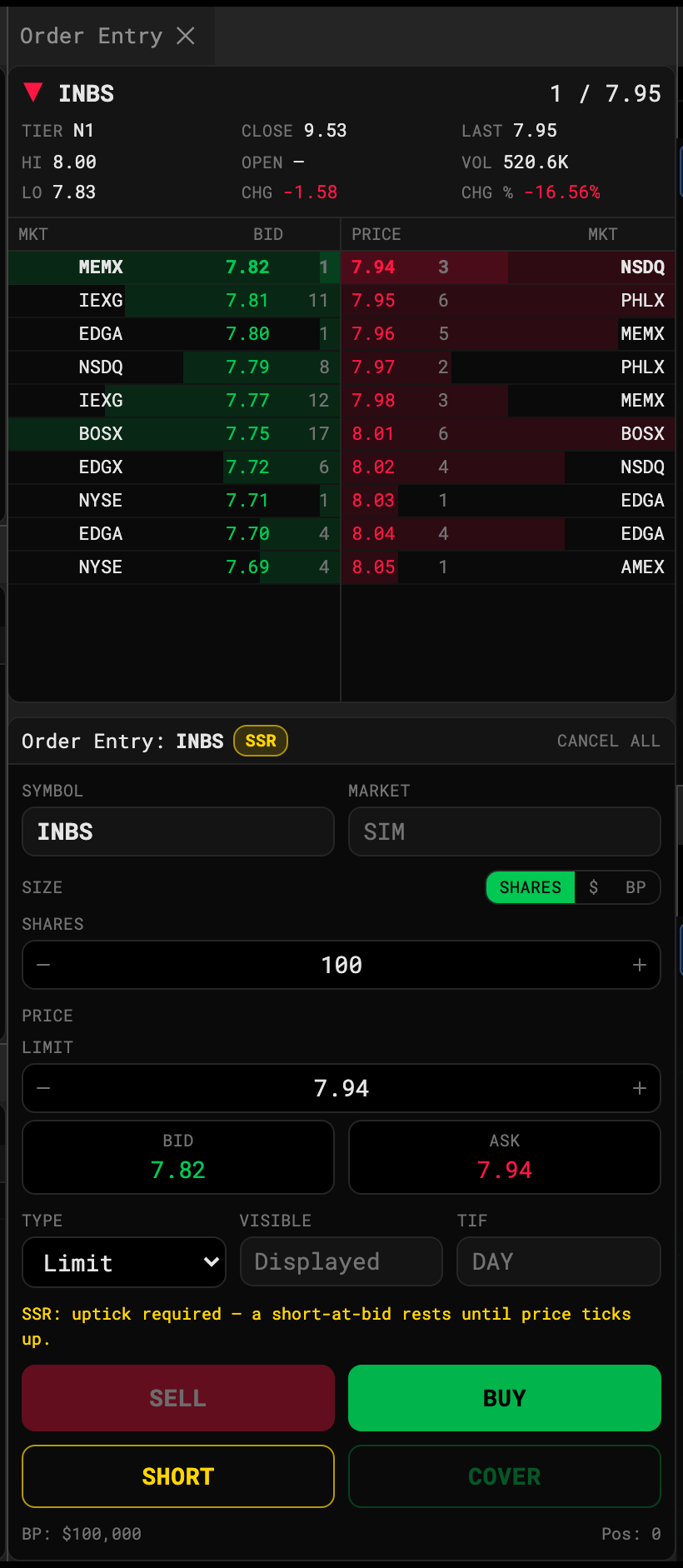
Fill in the ticket
- Size. Choose SHARES, $ (dollar amount) or BP (percent of buying power), then type or step the value.
- Price. Type a limit price, or tap BID / ASK to load the inside quote. The steppers move one tick, down to $0.0001 on sub-penny names.
- Type. Limit, Market, Stop or Stop Limit. TIF is always DAY — the session is one day.
- Press BUY or SELL. SHORT and COVER are for short positions — see Short selling and locates.
The line above the buttons tells you what’s missing (“Enter a limit price”) or what the order will cost.
After you press
The order shows in Orders as pending while its latency elapses, then working, then filled / partial / cancelled / rejected. Cancel All at the top of the ticket, or Esc, cancels everything working.
Loading prices from Level 2
Click any row in the Level 2 ladder to load its price into the ticket: the bid side arms SELL, the ask side arms BUY.
Rejections
The desk rejects like a broker would: no NBBO yet, not enough buying power, selling more than you hold, invalid price. The reason shows as a toast and in the Orders row.